Product Details
Product Description
Product Description
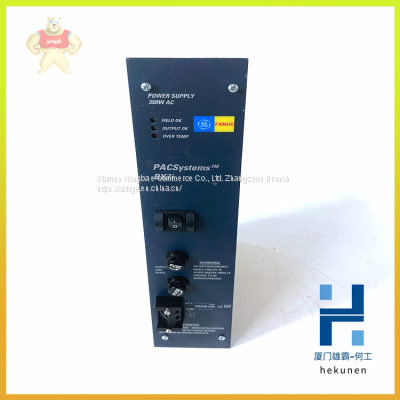
IC698PSA350 GE PLC power module AC Power 350W RX7i inventory
IC698PSA350 GE PLC power module AC Power 350W RX7i inventory
Our Email: 2235954483@qq.com
contact number:13313705507
contacts:HE
PACSystems RX7i CPUs with firmware versions 1.50 or later support
IC697PCM711 modules with firmware versions 4.05 or later. You must ensure
that you are using the correct firmware version of the PCM because the CPU
cannot check the PCM’s firmware version. (The module’s firmware version can be
found on a label attached to the EEPROM.)
PACSystems does not support the following for IC697PCM711:
▪ Connecting Machine Edition to the CPU through the IC697PCM711 module’s
serial ports.
▪ Access to Symbolic variables.
▪ WAIT mode COMMREQs.
▪ The following C functions are not supported:
chk_genius_bus
chk_genius_device
get_cpu_type_rev
get_memtype_sizes
get_one_rackfault
get_rack_slot_faults
▪ The C function write_dev will not write to read only reference tables (%S
references, transition bits, and override bits). If this is attempted, the call will
fail at run time and return an error code.
The following restrictions apply when using the IC697PCM711 with PACSystems:
%W memory partially supported. Only offsets 0-65535 of %W can be accessed
via the PCM.
▪ The Program Name is currently always LDPROG1 for PACSystems.
▪ In case of ERROR NACK, the Control Program number, privilege level and
other piggyback status data will be set to 0.
▪ If an application program running on the PCM accesses the VME bus, the
VME addresses being used by that program must be updated to agree with
the PACSystems RX7i VME addressing assignments. PACSystems RX7i
VME address assignments are described in the PACSystems RX7i User’s
Guide to Integration of VME Modules, GFK-2235.
▪ PACSystems CPUs return the major/minor type of the Series 90-70 CPX935
(major type 12, minor type 35) to the PCM scratch pad memory when
communicating with a PCM.
▪ If your RX7i application program needs to access the PCM’s dual port
memory, use the BUS READ and WRITE functions. When accessing the
PCM, set the Region parameter on the function block to 1. (For the PCM,
region 1 is predefined to be the module's entire dual port memory.)
Note: For details on operation of the IC697PCM711, refer to the Programmable
Coprocessor Module and Support Software User’s Manual, GFK-0255.
>>
Coil Springs for Kids Plastic Coil Relieves Stress and Anxiety Fidget Toy for Children Adults Unique Kids & Adults Valentines Stocking Stuffer Gift Idea Novelty
>>
502L Factory Direct Selling CB SAA SASO Approved Flowers Series Refrigerators
>>
High Precision Custom Wood Drill Machine with CE Certification
>>
High Glossy Plastic Sheet black ABS Styrene Sheets for vacuum forming
>>
LPG cylinder production machine hydraulic punch
>>
Automatic Stretch Hooding Machine 60 Pallets Per Hour
>>
Advanced Continuous Decanter Centrifuge for Crop Processing Solutions
>>
Silver-Loaded Activated Carbon
>>
Taijia TM-8812 Ultrasonic Thickness Gauging Measurement Of Thickness ,Thickness Gauge Conversion Meter Tester
>>
polyether adsorbent magnesium aluminum silicate CAS 71205-22-6
>>
New Style Design Popular Shoulder Handbag Fashion Ladies Bucket Bag for Women
>>
Custom Golf Glove Left Hand Right Hand Soft Fiber Breathable Non-Slip Golf Gloves Men Color
>>
High Quality 3′x3′ 100 Pages Poly Pack Yellow Regular Custom Sticky Notes
>>
ISO4017 304 Stainless Steel Hex Head Bolt Heavy Full Thread
>>
Auto Parts OE No. 4n0857535A Side Mirror Glass
>>
Outdoor IP65 Waterproof LED Solar Light Simulation Stone Shaped Lamp Garden Lawn Decorative Lights
>>
Customized Pet Preform Mould Plastic Bottle Preform Injection Molding
>>
Hot Sale Machinery Automatic Hzs 60 to 120m3/H Concrete Batching Plant
>>
Drywall Chipboard Self Tapping Screw Making Machine
>>
Handrive Low Speed High Torque Psms Direct Drive Rotary Brushless Motor for Sorting Machine