Product Details
Product Description
Product Description
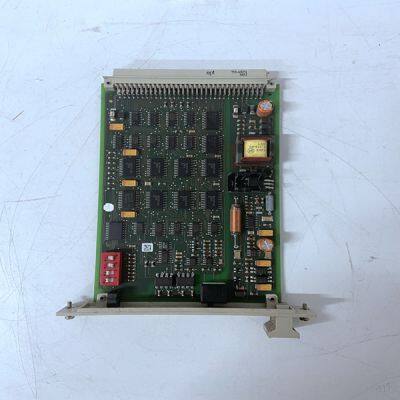
Brand:HIMA
Type:F7553
Origin: the United States
Warranty: 365 days
Colour: new/used
Shipping method: Courier delivery
Spare parts spare parts, the main DCS control system of PLC system and the robot system spare parts,
Brand advantage: Allen Bradley, BentlyNevada, ABB, Emerson Ovation, Honeywell DCS, Rockwell ICS Triplex, FOXBORO, Schneider PLC, GE Fanuc, Motorola, HIMA, TRICONEX, Prosoft etc. Various kinds of imported industrial parts
The yellow DUAL LED is OFF when any of the following conditions are met: • CI872 is run in single configuration. • CI872 is run in redundant configuration, but it acts as a backup module. All LED's are OFF Possible Cause 1: Difference in the CI872 position in the Hardware Tree (in the Control Builder) as compared to the CI872 position on the CEX-Bus. Corrective Action 1: Check and correct the position of CI872 module in the Hardware Tree in accordance with the position on CEX-Bus, or vice-versa. Possible Cause 2: The CI872 module is hot inserted and the configuration is not downloaded to the controller. Corrective Action 2: Ensure that the module is configured in the Hardware Tree (in the Control Builder) for that position, and that the configuration is downloaded to controller. Possible Cause 3: The CI872 is just hot inserted and it is in the process of configuration. Corrective Action 3: Allow time for the module to initialize.
Possible Cause 1: MTMConnect and/or MTMReadCyc and/or MTMDefCyc are disabled. Corrective Action 1: Enable MTMConnect, MTMReadCyc, and MTMDefCyc function blocks. Possible Cause 2: MTMConnect and/or MTMReadCyc and/or MTMDefCyc function blocks show a bad status. Corrective Action 2: Check the reason for the bad status (see the status codes for MTMCommLib in the Online Help), and take the appropriate corrective action for the bad status. Possible Cause 3: The value for the Channel parameter in the MTMConnect function block is not in accordance with the position of the CI872 module in the Hardware Tree. Corrective Action 3: Ensure that the value of the Channel parameter in the function block is in accordance with the position of the CI872 module in the Hardware Tree. Corrective Action 4: If the condition persists even after performing corrective actions 1 to 3, then hot remove and hot insert the CI872 module on the CEX-Bus and allow time for the module to initialize. If the corrective action is to replace the faulty CI872 module, replace it with another CI872 module which has the same version of hardware and firmware. CI872 supports hot swap
>>
12V 75AH Sealed Maintenance Free Car Automotive Auto Truck Battery
>>
Door Frame LVL Poplar /LVL for Bed Slat /Poplar LVL Plywood for Sofa Frame
>>
2024 TFS Large Curved Curtain for Aircraft Hanger
>>
High Speed Plastic Bottle Water Oil CSD Preform Plastic Carry Handle Injection Molding Manufacturing Production Machine
>>
3/5/8t Gh20 Crawler Lifting Platform for Sale
>>
Outdoor SIP Protocol POE Speaker IP66 Waterproof Speaker 30W Horn Speaker PA System Audio Speaker
>>
New Original 400W 3000rpm Sinusoidal Design 3 Phase Servo Motor
>>
Ipk-01-080 OE 42607-33011 TPMS Tire Pressure Sensor Monitor Prius 2004-2009 Nhw20
>>
Custom 230g-510g Glossy/Matte Laminated Frontlit & Backlit Digital Printing PVC Coated Flex Banner for Indoor and Outdoor Advertising Display
>>
3V Coin Cell Button Battery Lithium Battery Cr1616 Cr1620 Cr1632 Cr2032 Lithium Battery for Watch
>>
50 ml Clear Transparent Bottle Glass Jar with Cork Lid
>>
Plastic Tool Toolings for Medical Insulin Pump Components
>>
Manufacturer Directly Algae Biomass Decanter Centrifuge
>>
Hzs180 M3/H The Concrete Mixing Plant & Concrete Batching Plant The Globe of Mixing Mastery!
>>
Used 2020 Zoomlion 59m Concrete Boom Pump Machinery Benz Chassis
>>
Great Quality Children Adult Oil Painting Artist Brush DIY Paint Painting Tool Art Set School Office
>>
Most selling product closet cabinet refrigerator dehumidifier singapore
>>
Surgical Face Mask Packaging Box,Box Packaging For Surgical Mask
>>
Hot Sales Metal Stamping Parts for VW Auto Car Part
>>
Anodized Aluminum Chain Link Fly Screen Double Hook Chain