Product Details
Product Description
Product Description
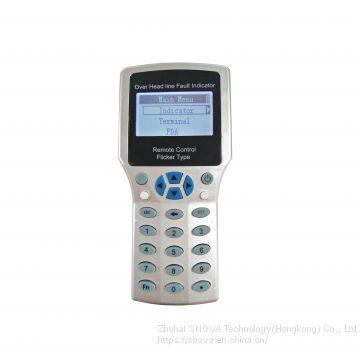
Remote Control PDA
OR
Description
Remote Control PDA(SNV306.1) is a Tool that used for communication between user and Fault indicator(SNV308.1) and communication terminal (SNV309.1). It communicate basing on wireless 433M.
When remote Control PDA successfully connected with fault indicator, then user can read and change indicator’s parameter setting. At same time, user read indicator’s real time data, indicator battery voltage, real time current of conductor line. Etc.
Operation instruction
1. short press “power on/off” key, Open the remote control PDA.
2. go into the “setting tool” interface.
3. On the “setting tool” interface, there are three Item:
Setting tool
|
Sensor
|
Terminal
|
About this
|
*Sensor menu: there is for operating for fault indicator
* Terminal menu: it is for operating for communication terminal
* About this: it is for operating for remote control PDA
4. How to operate: Sensor
On the “setting tool” interface, choose the “sensor” item, and press “enter key”. Then go into the a new interface, “ Sensor setting”. This interface include the below Item.
Sensor setting
|
Sensor select
|
Basic parameter
|
Working parameter
|
Online test
|
Reset sensor
|
*Sensor select. It is for wake up indicator sensor. and searching indicator sensor. Then choose indicator. Note: “wake up” means to open indicator sensor 433M port, make it into communication state. “search indicator” means make indicator establish communication. Only when searched indicator’s ID number, then user can operate this indicator.
*Basic parameter. It is display the indicator’s basic parameters. Tips: Please do not change it.
*Working parameter. It means indicator will use this parameter to calculate , analyze and judge fault.
*All parameter. It display all parameter of the indicator, including basic parameter and working parameter.
4.1 How to operate : sensor select
*on the “sensor setting” interface, choose the “sensor select”, then go into a new interface, “sensor select”. It include the below 3 items.
Setting select
|
Wake up
|
Sensor list
|
Single find
|
4.1.1 Wake up:
choose “wake up”, and press enter key. Then go to wake up operating.
4.1.4 How to check and operate indicator after added ID code on sensor list?
>>
Ultra-Precision Lathe Machine for Exquisite Machining
>>
Cartoon Resin Statue Bearbrick Home Decor Toys Bearbrick Sculpture Statue Resin Cartoon Statue for Decoration
>>
Profession GPS Splitter for Sale
>>
Byloo red fires color fishing rod 8 ft novice kids beginners children child travel fishing rod & reel
>>
Magnetic Table Surface Grinding Machine M7140*1000 High Precision Surface Grinding Machine Belt Grinding Machine
>>
Meidi China New 1200W Motor Cheap Three Wheeler 3 Wheel Agricultural Trike Adult Motorcycle Triciclo Eletrico Cargo Vehicle Electric Tricycle with Shed Roof
>>
Reusable Waterproof Custom Logos Laminated Printing PP Woven Shopping Bags
>>
29412EX bearing,Screw Conveyors 29412-E1 Axial Spherical Roller Bearings Gearboxes bearing,WKKZ BEARING,export@wkkzbearing.com
>>
1100W 80n. M Portable Brushless Impact Cordless Drill Multifunction
>>
Small Diesel 186f Power Tiller Gear Drive Riding 15HP Micro Tiller for Agricultural
>>
Transparent surgical membrane
>>
NAVIFORCE NF9134 New design men wrist watch dual display multi-functional led mens watch digital analog
>>
Colo-6020 Industrial Oven for Batch Powder Coating Manual Large Gas Curing Oven
>>
Premax Wholesale Human Hair Wig Fumi Curly 13X4 HD Transparent Lace Frontal Pre Plucked Hair Wigs
>>
Automatic Digital Round Knife Textile Cloth Fabric Apparel Flatbed Cutting Machine
>>
Thin Film Intelligent Electronic Tensile Machine Plastic Film Tear Tensile strength Test Equipment
>>
OEM Supplier Wholesale Custom LOGO Luxury Corrugated Paper Airplane Box cloth shoes Unique Colorful Printed Paper Packaging Box
>>
Pulverizer’s Guardian Wall in Power: Reliable Liners for Steady Coal Powder Outpu
>>
Pretty Small Wheeled Clothes Airer Rack Rail
>>
Hot sale 8 wires 4 balls automatic stainless steel mesh scourer making machine