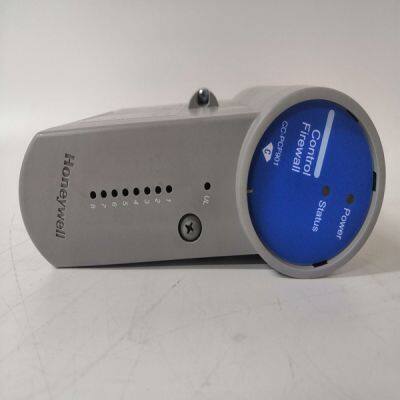
Product Details
Product Description
Product Description
Brand: HONEYWELL
Type:CC-PCF901
Origin: the United States
Warranty: 365 days
Colour: new/used
The VMIVME-7807/VME-7807RC VME SBCs have several connectors for their I/O ports. Wherever possible, the VMIVME-7807/VME-7807RC use connectors and pinouts typical for any desktop PC. This ensures maximum compatibility with a variety of systems. Connector diagrams in this appendix are generally shown in a natural orientation with the SBC mounted in a VME chassis.The mouse/keyboard connector (J10) is a standard 6-pin female mini-DIN PS/2 connector as shown in Figure A-4. The mouse/keyboard connector uses a “Y” splitter cable to separate the mouse and keyboard signals. The “Y” splitter cable is shown in Figure A-5 on page 72, the pinout in shown in Table A-3 on page 72.NOTE: The Mouse/Keyboard pinout shown above has pins 2 (Keyboard Data) and 6 (Keyboard Clock) signals on the Mouse cable. This may not work with some Keyboard and Mouse devices. We recommend that you contact support.embeddedsystems@gefanuc.com for more information.This appendix gives a brief description of the setup options in the system BIOS. Due to the custom nature of GE Fanuc Embedded Systems’ Single Board Computers, your BIOS options may vary from the options discussed in this appendix. AMI refers to their BIOS setup screens as ezPORT. For a complete description of all the options available with the AMI BIOS, please visit and download their ezPORT PDF file.
The options listed on AMI’s web site may not be available on your system. To Access the First Boot setup screen press the F11 key at the beginning of boot. To access the ezPORT setup screens, press the DEL key at the beginning of boot.The VMIVME-7807/VME-7807RC have a First Boot menu enabling the user to, on a one time basis, select a drive device to boot from. This feature is useful when installing from a bootable disk. For example, when installing Windows XP from a CD, enter the First Boot menu and use the arrows keys to highlight ATAPI CD-ROM Drive. Press ENTER to continue with system boot. This feature is accessed by pressing the F11 key at the very beginning of the boot cycle. The selection made from this screen applies to the current boot only, and will not be used during the next boot-up of the system. If you have trouble accessing this feature, disable the QuickBoot Mode in the Boot BIOS setup screen. Exit, saving changes and retry accessing the First Boot menu.
>>
Wholesale Streetwear Oversized Blank Custom Logo Graphic Printing Mens Unisex Blank Plain Men Cotton Heavyweight T Shirt
>>
Fully Automatic Two RAM Baler Plastic Bottle Baling Machine
>>
KEYCOOL T1 R410a 9000BTU 48V DC Wall Mounted 100% Solar Absorption Air Conditioner
>>
Decorative Hanging Metal Chain link Curtain Fly Screens
>>
High Density Soft Foam Pocket Spring Mattress for 5 Star Hotel Project
>>
New Design CE EPA EURO5 mini skid steer loader china hot sale mini skid loader
>>
PVC PP PE Layflat Hose Making Machine
>>
Multifunctional Herbal Stem and Leaf Separator Mugwort Leaf Harvest Machine
>>
Manufacturer Competitive Price En 20471 Modacrylic Cotton Antistatic Flame Retardant Reflective Fluorescent Hi-Vis Single Jersey Knitted Fabric
>>
Hydraulic Pressure Regulator G-Hn2m Kawasaki Series K3V112 Hydraulic Control for Dh225-9 Pump Regulator
>>
New Luminescence Double Sides Reflector 2024 Reflective Plastic Road Stud
>>
Manual Shear and End Welder Machine Apply to Steel Tube Factory
>>
Whole teak wood kitchen cabinets set prices in india
>>
Cm140 (CM125-CM1200) Zhishan Electric Gasoline Diesel Portable Cement Concrete Mixer Machine
>>
Professional Multifunctional Office Exercise Chair Multi Squat Leg Raiser Office Body Fitness Smith Machine Gym Equipment
>>
Nanyang 9 M3 Microwave Wood Drying Machine China Factory Myh-18c Furnace Heating Timber Drying Kiln for Pine Wood
>>
100 D Polyester+30 D Spandex Brush Flower Print Fabric for Leisure Legging
>>
5h (CNC) Hot Sale Manual Turret Milling Machine Universal Milling Machine High Quality CNC Milling Machine
>>
Physical Testing Digital Multi-range Torque Wrench Calibrator Tester
>>
concrete cover meter ZBL-C310A concrete reinforcement corrosion detector