Product Details
Product Description
Product Description
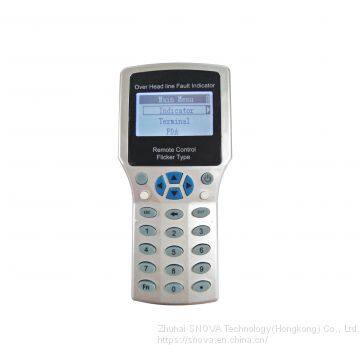
Intelligent Multifunctional Remote Control PDA
Description
Remote Control PDA(SNV306.1) is a Tool that used for communication between user and Fault indicator(SNV308.1) and communication terminal (SNV309.1). It communicate basing on wireless 433M.
When remote Control PDA successfully connected with fault indicator, then user can read and change indicator’s parameter setting. At same time, user read indicator’s real time data, indicator battery voltage, real time current of conductor line. Etc.
Operation instruction
1. short press “power on/off” key, Open the remote control PDA.
2. go into the “setting tool” interface.
3. On the “setting tool” interface, there are three Item:
Setting tool
|
Sensor
|
Terminal
|
About this
|
*Sensor menu: there is for operating for fault indicator
* Terminal menu: it is for operating for communication terminal
* About this: it is for operating for remote control PDA
4. How to operate: Sensor
On the “setting tool” interface, choose the “sensor” item, and press “enter key”. Then go into the a new interface, “ Sensor setting”. This interface include the below Item.
Sensor setting
|
Sensor select
|
Basic parameter
|
Working parameter
|
Online test
|
Reset sensor
|
*Sensor select. It is for wake up indicator sensor. and searching indicator sensor. Then choose indicator. Note: “wake up” means to open indicator sensor 433M port, make it into communication state. “search indicator” means make indicator establish communication. Only when searched indicator’s ID number, then user can operate this indicator.
*Basic parameter. It is display the indicator’s basic parameters. Tips: Please do not change it.
*Working parameter. It means indicator will use this parameter to calculate , analyze and judge fault.
*All parameter. It display all parameter of the indicator, including basic parameter and working parameter.
4.1 How to operate : sensor select
*on the “sensor setting” interface, choose the “sensor select”, then go into a new interface, “sensor select”. It include the below 3 items.
Setting select
|
Wake up
|
Sensor list
|
Single find
|
4.1.1 Wake up:
choose “wake up”, and press enter key. Then go to wake up operating.
>>
Fast and Economy Air Shipping From China to Us Amazon
>>
Camping Light Rechargeable Outdoor Mountain Camping White Light Warm Light Type-C Rechargeable Tent Light
>>
Taijia BM-III Pendulum Tester Pendulum Skid Tester Friction Coefficient Tester
>>
Large 1500*2500mm 100W Acrylic CO2 Laser Cutting Machine with Rdc 6445s Controller
>>
Natural Carrot Granules Infused with Sugar
>>
ETL Approval 18000Btu 220V 60Hz R410A Heat And Cool Mini Split Air Conditioner Heat Pump For North America
>>
Cocoa Bean Moisture Meter,Soybean Moisture Tester
>>
Hot Selling Brown Color Wood Chip Fruit Basket For Flowers For Sale
>>
Ergonomic Furniture Adjustable Computer Gaming Desk Office Chair with High Back Mesh
>>
Nylon Knotless Net for Fishing or Anti Bird
>>
Professional Four Sides Wood Thickness Planer for Heavy Duty Projects
>>
2022 new design hot sale american football jersey
>>
Hcvac New Ceramic Tiles PVD Vacuum Coating Machine/PVD Vacuum Plating Equipment
>>
Kraft Paper Bowl
>>
Poe to USB-C Gigabit Network Adapter Max 45W Supports Fast Charge Protocol
>>
Black Spike Light Max 35W
>>
Tree lamp
>>
Luxury Bath Towels Set Large Size Thick Bath Towel Sets 100% Cotton Bath Towels for Hotel Home Textile
>>
Home Appliances OEM Fan Remote Control Rubber IR Remote Controller
>>
Advanced Metal Stamping Tooling for Automotive and Home Appliance Parts