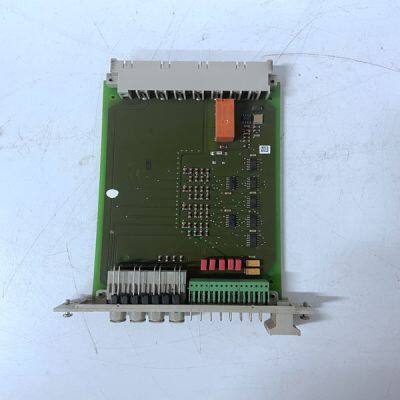
Product Details
Product Description
Product Description
Brand:HIMA
Type:F7133
Origin: the United States
Warranty: 365 days
Colour: new/used
Shipping method: Courier delivery
Spare parts spare parts, the main DCS control system of PLC system and the robot system spare parts,
Brand advantage: Allen Bradley, BentlyNevada, ABB, Emerson Ovation, Honeywell DCS, Rockwell ICS Triplex, FOXBORO, Schneider PLC, GE Fanuc, Motorola, HIMA, TRICONEX, Prosoft etc. Various kinds of imported industrial parts
The yellow DUAL LED is illuminated when the CI872 module is run in redundant configuration. The module that has the DUAL LED illuminated is the primary [active] module in a redundant configuration. Note: Even if the backup CI872 module runs with errors or fails in redundant configuration, the DUAL LED is still ON in primary CI872 module in redundant configuration.
Possible Cause 1: The CI872 module is in the process of upgrading the firmware (if the upgrade is in progress). Corrective Action 1: Wait for the firmware to be upgraded. Possible Cause 2: Fault in the CI872 module. Corrective Action 2: Hot remove and hot insert the CI872 module. Corrective Action 3: If the indication persists after performing the corrective actions 1 and 2, then replace the CI872 module. R(un) LED is ON The green R(un) LED indicates that CI872 is operational. Rx/Tx1, Rx/Tx2, and Rx/Tx3 LEDs are flashing There is one LED corresponding to each port on the CI872 module. When the LED corresponding to a port flashes, it indicates that communication is happening on that particular port. Rx/Tx1, Rx/Tx2, Rx/Tx3 LED is OFF Possible Cause 1: The fiber optic cable is not connected or it is not connected properly to the port. Corrective action 1: Do any of the following: • Check the corresponding optical cable connections, that is, the connections for reversed transmitter and receiver optical cables for that particular port, and the connections on the DOW MOD5 controller. • Check the Network Controller Board (NCB) on the MOD5 Controller connected to that particular port. Possible Cause 2: The configuration is not downloaded from the Hardware Tree (in the Control Builder) to the controller. Corrective Action 2: Ensure that the module is configured in the Hardware Tree for the correct position and the configuration is downloaded to controller.
>>
Custom Printing Logo Electronic Carton Charger Usb Platooninsert Paper Packaging Box Earphone Headset Package Cable Paper Boxes
>>
China Air Freight Goods to The Philippines, Atomizer, Batteries, Cosmetics
>>
Nonwoven Fabric Needle Punching Complete Equipment Production Line 2.5m
>>
Surface Grinder Flat Grinding Machine with Technology Knife Grinding Machine
>>
Cosmetic Materials/Ingredients Pomegranate Peel Extract Ellagic Acid with Whitening Effect
>>
High Precision 0.001mm Metal-Cutting Machine Tools CNC Lathe Die Sinking
>>
CNC 12 Axis Camless Spring Forming Machine Wire Rotating Spring Machine
>>
11mm 14mm 16mm FRP Fiberglass Conduit Duct Rodder Snake Rodding cane
>>
Customized 35cm 45cm 55cm Motorcycle Courier Parcel Hot Meal Sprate Rider Food Delivery Bag For Bike
>>
Simple Hospital Patient Transfusion Medical IV Infusion Manual Hemodialysis Chair
>>
Tabltop Magnetic Type Single Head Dual Rail Automatic Screw Fastening Machine
>>
120X260X55 mm 7324 7324c 7324AC 7324bHigh Frequency Angular Contact Ball Bearing for Booster Pump
>>
PMC-D726M Three-Phase Multifunction Power Energy Meter LED RS-485 Modbus RTU Pulse Output
>>
Automatic Belt Hzs Concrete Plant Concrete Batching Plant with Twin Shaft Mixer
>>
ABC/Acbca 1500mm PE Stretch Film Casting Machine Film Production Line
>>
aluminium double glazed windows aluminum folding windows bifold window
>>
Eco friendly wheat straw hotel disposable toothbrush
>>
275L China Supplier A++ Energy Saving Home Use Modern Refrigerator With Water Dispenser
>>
MOCAP Hydraulic valve PVC pipe plastic cover plug with reasonable price
>>
Custom Precision Anodized Machining Aluminum CNC Components OEM Aluminum CNC Machining