Product Details
Product Description
Product Description
Focus on DCS, PLC, robot control system and large servo system.
Main products: various modules / cards, controllers, touch screens, servo drivers.
Advantages: supply of imported original products, professional production parts,
Fast delivery, accurate delivery time,
The main brands include ABB Bailey, Ge / fuanc, Foxboro, Invensys Triconex, Bently, A-B Rockwell, Emerson, ovation, Motorola, xyvom, Honeywell, Rexroth, KUKA, Ni, Deif, Yokogawa, Woodward, Ryan, Schneider, Yaskawa, Moog, prosoft and other brands
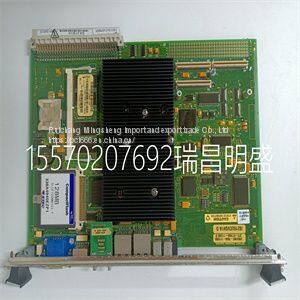
IS215UCVGM06A IS215UCVGH1A VMIVME-7666-111000
CSome blocks contain alphanumeric codes. These codes identify the procedure that describes the steps to complete an indicated task. Complete all steps given in a procedure before continuing to the next procedure. The procedures have check boxes in the margin by each procedural step. When performing a procedure, check each box as each step is completed. By treating each task as a separate entity, the procedures provide an easy method for finding the information needed to perform each task in the configuration sequence. Figure 8-3. Configuration Sequence VIEW ING OR MODIFYING C O N F IG U R AT IO N ? BASIC OR ADVANCED PROGRAMMING? TR4043A PA SS W O R D PROTECTED? PAS S W O R D PROTECTED? CHANGE PROGRAMMING MODE? MODIFYING A PA R A M E TER ? VIEW ING BASIC MODIFYING ADVANCED YES YES YES N O DONE PROGRAMMING MODE CHANGE PR14 ENTER PAS S W O R D ENTER PAS S W O R D MODIFYING C O N F IG U R AT IO N W HILE VIEW ING PR13 N O N O N O YES A B S TA RT SELECTING VIEW OR MODIFY C O N FIG U R ATIO N S TAT E PR12 CONFIGURATION CONFIGURATION SEQUENCE WTPEEUI520002A1 8 - 5 Figure 8-4. Advanced Configuration Sequence TR4044A CONDUCTIVITY O R C O N C E N TR ATIO N A N A LY Z E R ? TC.COEF SELECTED? STD.KCL SELECTED? NEUTRAL, ACID, OR BASE SELECTED? MANUAL SELECTED? USR.DEF SELECTED? 0.01 CELL C O N S TA N T ? SET HARDWARE C O N F IG U R AT IO N LOCKOUT? CHANGE TE M P E R ATU R E SETTING? C O N C EN TR ATIO N N O N O YES N O N O YES YES N O YES YES YES N O YES YES N O N O CONDUCTIVITY DONE A A N A LY Z E R A N D S E N S O R C E L L C O N S TA N T T Y P E SELECTIONS TEM PE R ATU R E S EN SO R A N D C O M P E N S ATIO N TYPE SELECTIONS PR15 PR17 C O N C E N T R AT IO N PROGRAMMING PR16 USER-DEFINED TEM PE R ATU R E COEFFICIENT PROGRAMMING PR19 TE M P E R ATU R E C O M P EN S ATIO N COEFFICIENT SETTING PR18 C O N FIG U R ATIO N LOCKOUT TE M P ER ATU R E C ALIBR ATIO N PR21 PR6 COMPLETING C O N FIG U R ATIO N PR20 CONFIGURATION CONFIGURATION SEQUENCE 8 - 6 WTPEEUI520002A1 Figure 8-5. Basic Configuration Sequence SET HARDWARE C O N FIG U R ATIO N LOCKOUT? CHANGE TEM P ER ATU R E SETTING? TR4045A MANUAL SELECTED? TC.COEF SELECTED? YES YES N O N O NO YES DONE YES N O C O N FIG U R ATIO N LOCKOUT TEM P E R ATU R E C A LIB R AT IO N PR21 PR6 T EM P ER ATU R E C O M P E N S ATIO N COEFFICIENT SETTING PR18 COMPLETING C O N FIG U R ATIO N PR20 B A N A LY ZE R A N D S E N S O R C E LL C O N S TA N T T Y P E SELECTIONS T EM P ER ATU R E SE N S O R A N D C O M P E N S AT IO N TYPE SELECTIONS PR15 PR17 INTRODUCTION WTPEEUI520002A1 9 - 1 SECTION 9 - SECURITY MODE INTRODUCTION The security mode of operation establishes password protection against unauthorized changes to transmitter functions by unqualified personnel. Password protection can be assigned to the calibrate and output/hold modes of operation, and the modify configure state of operation. SECURITY STATE The security mode of operation contains one state of operation. This state provides password protection of critical operating environments. Each password protected mode or state of operation can have its security state toggled on or off in the associated security screen. All security assignments must be made before assigning a password. The security of the security state itself is automatically set to on when one or more mode or state has the security on. One password assignment applies to all secured modes and states. Figure 9-1 shows the screen flow for the security state of operation. ENTERING PASSWORD When the security state has been set, the password must be entered to gain access to the modes and states that have been password protected. 1. When the password inquiry screen (PASSWD) appears: a. The display reads _ _ _. Use the smart key to increment the value of the blinking digit. b. When the first digit value is correct, use the smart key to move to the next digit. c. Repeat Steps 1a and 1b for each digit. 2. Press the ENRN SPIKE RETURN DAMPNG RET
>>
Eco-friendly Natural Round Shape Bamboo Dumpling Basket Chinese Mini Bambu Basket Cooker Dim Sum Sweetcorn Steamer
>>
High Density Polyethylene HDPE Plastic Sheets
>>
CE Certification Ie3 Efficiency 3 Phase Copper Winding Induction AC Electric Motors Aluminium
>>
350mm Saw Blade for Processing Granite, Marble, etc. Low Price on Sale
>>
Free Samples DOT-C2 Safety Reflective Warning Tape
>>
Factory Price Summer New Fashion Wedge Shoes Lovely Ankle Cross-Strap Outdoo Beach Sandal for Girls Women Outdoor, Wedges Sandals
>>
High-Quality 220V/380V Rated Voltage Electricity Intelligent Capacitor Devices
>>
Continuous Gelato Machine Batch Freezer Hard Ice Cream Machine
>>
Men and Women Quickly Dry Outdoor Shoes Handmade Leather Sandals Sneakers
>>
High Quality Caravan Trailer RV Trailer Flat Push Open Side Window
>>
Automatic Rotary Two Colours Plastic Gumboots Injection Molding Machine
>>
Kukai Beta Auto Locksmith Laser Key Cutting Machine with CE Certificate
>>
Biodegradable Planting Pot Making Machine
>>
Silicone Rubber Sheets (SK4001) , Heat Resistant
>>
Lab High Temperature Digital Rotary Viscometer Construction Machinery for High Temperature Testing
>>
ERW Pipe Production Line for Stainless Steel Tube Welding and Making Equipment Stronger Round Square Rectangular Pipe Making Machine Stainless Steel Tube Mill
>>
UV & 2-IR Explosion Proof Flame Detector Fire Alarm System (Dual Infrared & Single UV)
>>
Wood Plastic Composite Fluted Wall Panel WPC Cladding Boards Exterior Wall Panels
>>
boom gate
>>
Steel Fly Screen Mosquito Netting Aluminium Frame Sliding Glass Grill Design Aluminum Sliding Window