Product Details
Product Description
Product Description
Brand: ABB
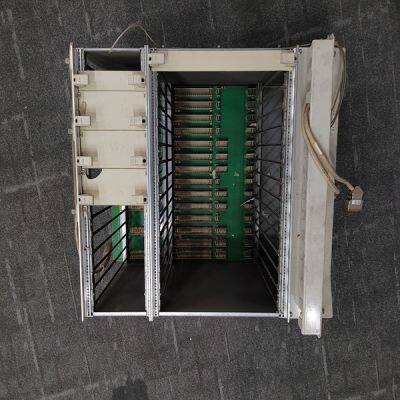
Type: RF522 3BSE000743R1
Origin: the Swiss
Warranty: 365 days
Colour: new/used
Shipping method: Courier delivery
Module of PLC, DCS, ESD system card, the card is a vibration monitoring system, steam turbine control system module, the advantages of the gas generator spare parts brand: Allen Bradley, BentlyNevada, ABB, Emerson Ovation, Honeywell DCS, Rockwell ICS Triplex, FOXBORO, Schneider PLC, GE Fanuc, Motorola, HIMA, TRICONEX, Prosoft etc. Various kinds of imported industrial parts of our products are widely used in metallurgy, petroleum, glass, aluminum manufacturing, petrochemical industry, coal mine, papermaking, printing, textile printing and dyeing, mechanical, electronic manufacturing, automobile manufacturing, plastic machinery, electric power, water conservancy, water treatment/environmental protection, boiler heating, energy, power transmission and distribution and so on.
Remote EXTR/ADM Setpoint The Extr/Adm control setpoint can be remotely positioned by an analog input (if programmed). The Remote Extr/Adm Setpoint input can be enabled by pressing the front panel YES key from the Remote Extr/Adm Status screen (screen 4), closing the Remote Extr/Adm Setpoint Enable/Disable contact (if programmed), or selecting Remote Extr/Adm Enable from either Modbus communications link.
Remote Extr/Adm Setpoint input is disabled by pressing the front panel NO key from the Remote Extr/Adm Status screen (screen 4), opening the Remote Extr/Adm Enable/Disable contact (if programmed), or selecting Remote Extr/Adm Disable from either Modbus communications link. See Table 5-14 for all possible Remote Extr/Adm control messages. MESSAGE 4 MEANING Rmt Extraction Disabled Remote Extraction is not selected Rmt Extraction Inhibitd Remote Extraction is inhibited and cannot be enabled Rmt Extraction Enabled Remote Extraction is enabled but not in control of the Setpt Remote Extract Active Remote Extraction is in control of the Setpt but not in control of the actuator output Remote Extr In Control Remote Extraction is in control of the Setpt and in control of the actuator output Remote Ext/Adm Disabled Remote Extr/Adm is not selected Rmt Extr/Adm Inhibited Remote Extr/Adm is inhibited and cannot be enabled Remote Extr/Adm Enabled Remote Extr/Adm is enabled but not in control of the Setpt Remote Extr/Adm Active Remote Extr/Adm is in control of the Setpt but not in control of the actuator output Rmt Extr/Adm In Control Remote Extr/Adm is in control of the Setpt and in control of the actuator output Rmt Admission Disabled Remote Admission is not selected Rmt Admission Inhibited Remote Admission is inhibited and cannot be enabled Rmt Admission Enabled Remote Admission is enabled but not in control of the Setpt Remote Admission Active Remote Admission is in control of the Setpt but not in control of the actuator output Remote Adm In Control Remote Admission is in control of the Setpt and in control of the actuator output Table 5-14. Remote Extr/Adm Messages The remote Extr/Adm control indications shown in Table 5-14 are available through the Modbus links: Remote Extr/Adm is Enabled, Remote Extr/Adm is Active, Remote Extr/Adm is In Control, Remote Extr/Adm is Inhibited, and Remote Extr/Adm Input Failed Alarm. In addition to these indications, the Remote Extr/Adm Input Setpoint is also available. Relay indications can be programmed to indicate Remote Extr/Adm Control Active and Remote Extr/Adm Control Enabled states. Alarms The ALARM key is always active in the RUN mode.
Figure 5-17 shows the screen that appears when this key is pressed. If there are no alarms detected, the screen will display the ‘Alarms Cleared’ message. When an alarm is detected, the Alarm relay is energized and the front panel Alarm key illuminates. In addition, the screen will automatically “jump” to the ALARM screen (as defaulted in the Service mode) and display the alarm condition. Table 5-15 lists all the potential alarm conditions and their cause. If more than one alarm condition is present, pressing the Down Arrow key will scroll through all active alarms. To view the most recent alarm, select the ALARM key. To clear any alarms that are no longer present, press the front panel RESET key, close the Reset contact input, or select Reset from either Modbus communications link.
>>
GAPV Low price for hyundai tucson 2016 LED fog light with lampshade with fog lamp 81220-GZWDT
>>
Wholesale Dark Skin Face Contour Natural Vegan Concealer Ultimate All Day Long Wear Full Coverage 3 Colors Makeup Concealer
>>
Solar Power Frequency Multifucntional Inverter
>>
Toption SS316L Vacuum Distillation Film Vacuum Evaporator Hemp Oil Making Short Path Molecular Distillation Machine
>>
DOT39 Standard 1kg Candela Laser Cryogen Gas Bottle R134A Refrigerant Cylinder
>>
High Quality Custom CNC Shaft Stainless Steel CNC Machined Long Transmission Shaft and Main Shaft
>>
River Dam Aquatic Weed Harvester Water Hyacinth Reed Cutter Cutting Ship
>>
Hydraulic Paper Cutting Machine Program Control Paper Cutter 115K Guillotine
>>
High Grade New Design Waste Tyre Thermal Pyrolysis Plant for Rubber Waste and Tires
>>
68131-04-4 Best Price Feed Grade Sodium Humate 60% Organic Activate The Soil Make Plants Stronger
>>
SIMCOM SIM7060 SIM7060R LPWA NBIoT Module
>>
Wholesale Clear Storage Bottle 60ml 125ml 250 Ml 500 Ml Wide Mouth Reagent Glass Bottle with Cork
>>
Four-Way Tire Valve Cores Remover Valve Core 4-way Repair Tools Auto Repair Tools
>>
Manual Universal Vertical Turret Milling Machine Hot Sale X6333
>>
High Cost Performance Motorcycle Spare Parts Motorcycle Engine Parts Honda /YAMAHA/Suzuki/Bajai/Tvs/Haojue/Scooter
>>
New Customized Steel Tube Mill Welded Making Pipe Welding Machine
>>
Hot Sale High Precision Heavy Cutting Surface Grinder Machine Magnetic Chuck
>>
ATC counter
>>
Clutch for Textile Weaving Rapier Loom Machine Gtm-as Ga737-a Wanli China Machine Ks-W-904
>>
Fluted Wooden Plastic Composite PVC Marble Wall Panel Wooden Wall Panel Model Design WPC Wall Cladding for Home Office