Product Details
Product Description
Product Description
Control PDA for Fault Locator In Transmission Lines
Description
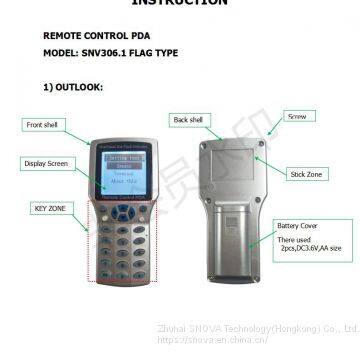
Remote Control PDA(SNV306.1) is a Tool that used for communication between user and Fault indicator(SNV308.1) and communication terminal (SNV309.1). It communicate basing on wireless 433M.
When remote Control PDA successfully connected with fault indicator, then user can read and change indicator’s parameter setting. At same time, user read indicator’s real time data, indicator battery voltage, real time current of conductor line. Etc.
Operation instruction
1. short press “power on/off” key, Open the remote control PDA.
2. go into the “setting tool” interface.
3. On the “setting tool” interface, there are three Item:
Setting tool
|
Sensor
|
Terminal
|
About this
|
*Sensor menu: there is for operating for fault indicator
* Terminal menu: it is for operating for communication terminal
* About this: it is for operating for remote control PDA
4. How to operate: Sensor
On the “setting tool” interface, choose the “sensor” item, and press “enter key”. Then go into the a new interface, “ Sensor setting”. This interface include the below Item.
Sensor setting
|
Sensor select
|
Basic parameter
|
Working parameter
|
Online test
|
Reset sensor
|
*Sensor select. It is for wake up indicator sensor. and searching indicator sensor. Then choose indicator. Note: “wake up” means to open indicator sensor 433M port, make it into communication state. “search indicator” means make indicator establish communication. Only when searched indicator’s ID number, then user can operate this indicator.
*Basic parameter. It is display the indicator’s basic parameters. Tips: Please do not change it.
*Working parameter. It means indicator will use this parameter to calculate , analyze and judge fault.
*All parameter. It display all parameter of the indicator, including basic parameter and working parameter.
4.1 How to operate : sensor select
*on the “sensor setting” interface, choose the “sensor select”, then go into a new interface, “sensor select”. It include the below 3 items.
Setting select
|
Wake up
|
Sensor list
|
Single find
|
4.1.1 Wake up:
choose “wake up”, and press enter key. Then go to wake up operating.
>>
Flexible PU body kits for BMW X6 E71 body kit for BMW X6 body kits A C Style
>>
High Quality Performance Mobile Cone Crusher
>>
Cost-Effective Veterinary Color Doppler Ultrasound Machine with Rectal Probes
>>
unique design laminated decorative wired glass wire mesh wholesale
>>
New Rotary Quadrature Encoder ECN1313 2048 For Elevator Parts
>>
Best price automatic mineral water rinser filler capper machine bottled water production line
>>
New Crop fresh frozen red pepper diced
>>
Hot selling Frame High Definition acrylic wood Frame Pack
>>
Mini Power Tiller Cultivator Tractor Rotary Ploughing Cultivators
>>
Auto Mattress Tape Edge Sewing Machine (BWB-4C)
>>
Water Jet Weaving Looms, Carpet Cleaning Machine, Computerized Embroidery Machine in China
>>
HC-A012 High resolution 15 inch LCD PW Function Ultrasound/Portable Color Doppler Ultrasound scan
>>
Wholesale Flying 3X5FT Polyester Big Rainbow Lgbt Lesbian Gay Pride Flag Rainbow Flags
>>
n type female to TNC type female connector
>>
Spinner Ball RC UFO Flying Ball Toy with Wand
>>
Kubota DC70 Parts Roller 5t072-23180 Steel
>>
Factory Price CE Certificated Wood Pallet Portable Drum Chipper for Sale
>>
Kitchen & Tabletop Placemats Anti Slip Tableware Decoration Round Plastic Placemats
>>
CPM92H Ion exchange resin for condensate polishing-CPM92H
>>
Most Popular Horizontal and Vertical Crimping Machine 3" Hydraulic Hose Pressing Tool