Product Details
Product Description
Product Description
Focus on DCS, PLC, robot control system and large servo system.
Main products: various modules / cards, controllers, touch screens, servo drivers.
Advantages: supply of imported original products, professional production parts,
Fast delivery, accurate delivery time,
The main brands include ABB Bailey, Ge / fuanc, Foxboro, Invensys Triconex, Bently, A-B Rockwell, Emerson, ovation, Motorola, xyvom, Honeywell, Rexroth, KUKA, Ni, Deif, Yokogawa, Woodward, Ryan, Schneider, Yaskawa, Moog, prosoft and other brands
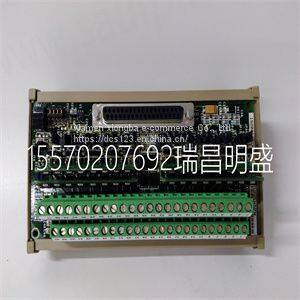
| IS200DTAIH1ACC IS210DTAOH1AA |
Chapter 5 – Fault Tracing This chapter gives step-by-step diagnostics information for finding out the causes and corrections to the most common problems with the adapter. Take advantage of the group 52 diagnostic counters. If necessary, use parameter 9902 APPLIC MACRO to restore the parameter settings of the ACS 140 to their default values and then reconfigure the drive. Power LED of the adapter is illuminated, but Receive (RxD) and Transmit (TxD) LEDs are not blinking • The master device is not transmitting. • The cable is not correctly connected to connector X2/X3 (in RS485 mode) or X4 (in RS232 mode). • Operation mode (RS485 or RS232) of the adapter is not correct: Check jumper S4. Receive LED blinks but there is no response from the ACS 140 (Transmit LED is not blinking) • The master device is not using the same communication settings as the ACS 140. • The ACS 140 is using the communication settings of the control panel: Turn power off and then on again. Receive and Transmit LEDs are blinking, but the drive does not follow commands given by the master device • The drive is not in remote control mode. • The drive parametering is incorrect: Control commands are not accepted from the serial communication channel. Receive and Transmit LEDs are blinking, but the responses ACS 140 sends are not intelligible • DIP switch S1 and parameter 5202 COMM SPEED do not have the same speed setting. • Ambient noise level is too high. The ACS 100-PAN control panel is not operating and panel display blinks • Panel is not properly connected to the drive. • The drive is using different communication settings from the panel: Connect the panel and then turn power off and then on again. Group 52 is not visible on the control panel • Make full parameter set visible by selecting menu function -LG- and pressing and holding ENTER button down until display blinks.10 Motor overtemperature 11 Motor stall alarm
>>
Mi Air 2 Pro TWS Airdots 2 Pro Mi True Wireless Charging Earphone Noise Cancellation Earbuds 3 MIC ENC
>>
Rotary Farm Cultivator Machine for Effective Small Farm Management
>>
living room furniture sofa
>>
Italy imported FIAM air motor 28M1700D-ER16
>>
Cabinet Bathroom Vanity Stone Counter
>>
ZC-180H HDPE Corrugated Pipes Machine for Drainage
>>
Plastic Bottle / Can / Film / Pipe Plastic Crusher Household Waste Shredder Machine
>>
10.1inch Touch Screen 4K 5MP IP68 Underwater Marine Diving Inspection Camera System
>>
Wmould China Manufaturer DIN Standard Date Stamp Ddati1800 for Plastic Injection Mould
>>
Gloss Black Front Honeycomb Mesh Upper Bumper LED Grill fit for Ford Escape Kuga 2017-2019
>>
LED RGB Pixel Tube Light DMX 1m 360 Degree Tube Light RGB Colorful DMX Control LED Tunnel RGB Wedding Party Stage Lighting IP65
>>
Affordable Durable Painting Pen with High Satisfaction Ratings
>>
Hot Selling PP Capacity Ingot Shaped Ice Bucket with Spout
>>
Replacing steel rear car door for T31 X-trail 2008 auto body parts
>>
White Plastic Strapping for Brick Packing Using
>>
Plastic Child Safety Seat/Restraint System/Latch/Baby Seat/Infant Car Seat/Car Seat/Isofix/Children Safety Seat/Blow Moulding Machine/Blow Molding Machine
>>
Kids shoes
>>
Steel Pipe and Shaft Automatic Straightening Equipment
>>
Precision PTFE Polytetrafluoroethylene Plastic High Quality White PTFE Bolt
>>
Stainless Steel Polishing Machine for The Sheet and Coil with The Grinding Belt and Brushing Roller